AutoFTP — Scheduled FTP Downloader
AutoFTP lets you create multiple download jobs on Windows and sync files from FTP / FTPS / SFTP servers at fixed daily times, on selected weekdays or month days, with incremental filters and history.
FTP scheduled downloader
Pull FTP files on schedule — reliably
AutoFTP lets you create multiple download jobs on Windows and sync files from FTP / FTPS / SFTP servers at fixed daily times, on selected weekdays or month days, with incremental filters and history.
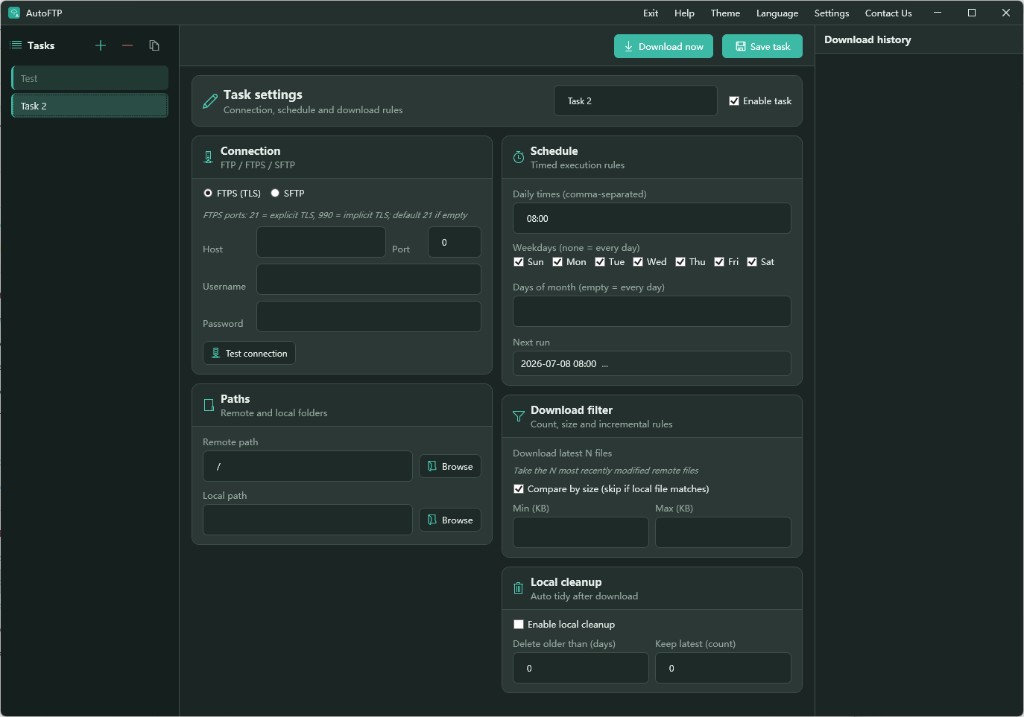
Key features
Multi-protocol
FTP, FTPS (TLS), and SFTP with connection test; save host, port, username, and password per task.
Multi-task
Create, duplicate, or delete tasks in the sidebar; enable or disable each job independently.
Flexible schedule
Multiple daily times, weekday checkboxes, days-of-month rules, and next-run preview.
Download filters
Download latest N files only, skip when local size matches, and set min/max KB limits.
Local cleanup
Optionally delete files older than N days or keep only the latest copies to save disk space.
Download history
Right-side history panel logs each run for troubleshooting and audit.
Quick start
- Download and run AutoFTP.exe Get the package from this site and launch it; switch theme or language in Settings on first run.
- Create a task: connection and paths Enter server credentials, remote folder, local folder, and optional download filters.
- Set schedule and enable Pick run times and weekdays, check Enable task, then Save; use Download now for a manual run anytime.
Download AutoFTP for free
Ideal for ops and data teams syncing reports, logs, and backup files on a schedule.
Download AutoFTP.exe