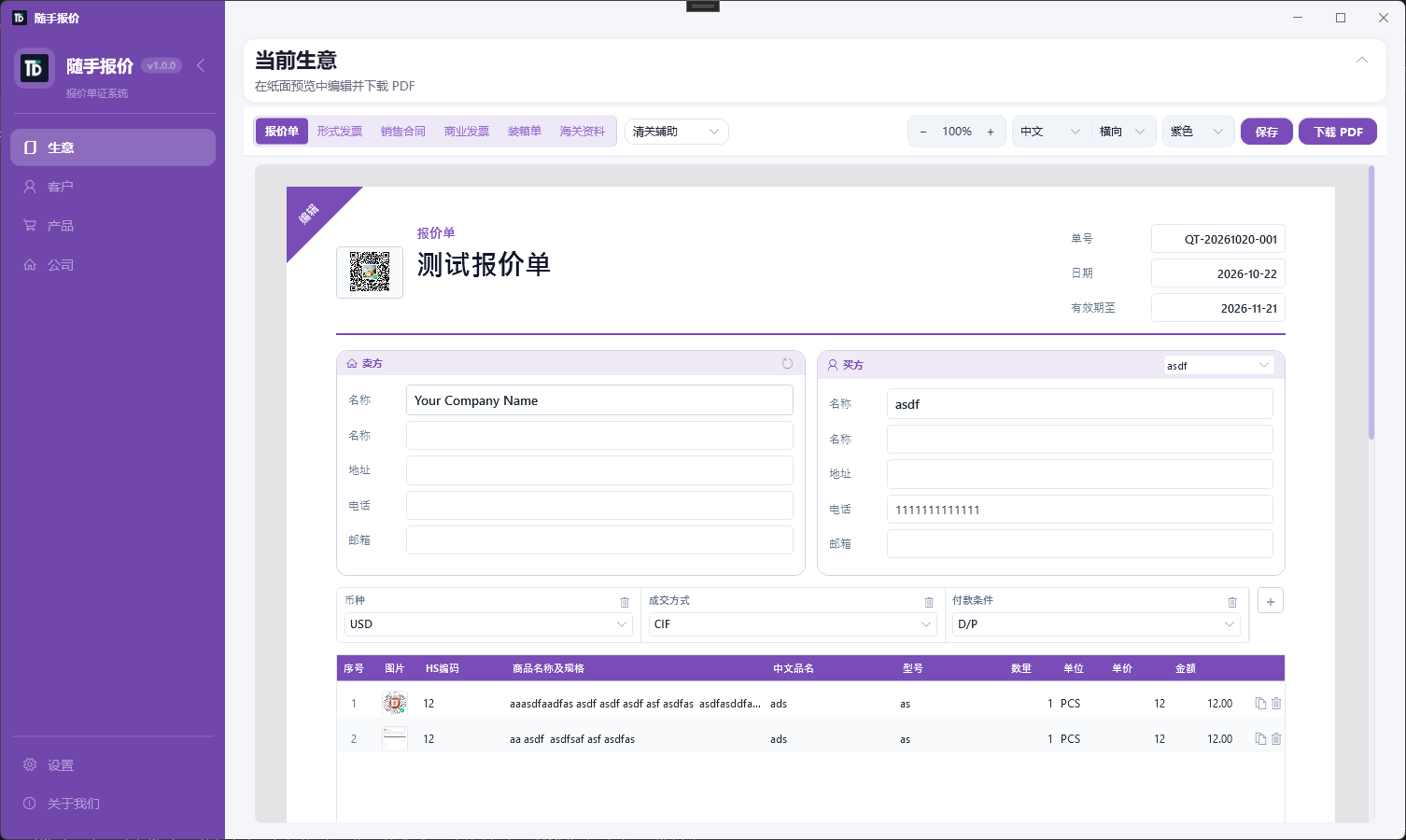
Suishou Baojia Desktop
Windows offline quoting and trade docs: data stays on your PC, open and go, fast PDF export. Covers Quotely and TradeDocs scenarios.
Excel to SQL, HTML to Excel, and SQL Server data import tutorials
Practical guides for Excel, SQL, PDF, and developer workflows you can run in the browser.
Windows offline quoting and trade docs: data stays on your PC, open and go, fast PDF export. Covers Quotely and TradeDocs scenarios.
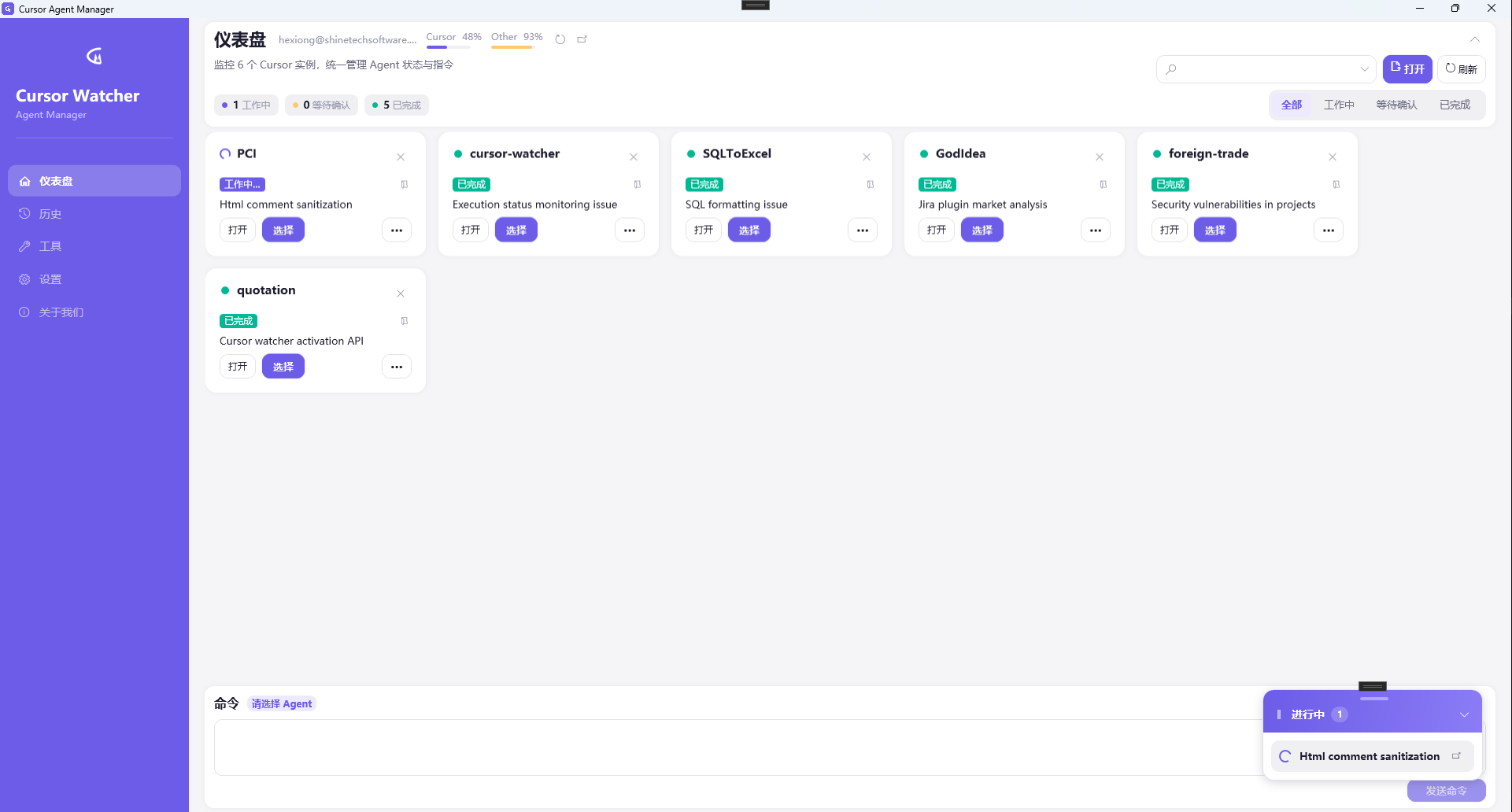
Windows desktop app to monitor multiple Cursor Agents: status filters, one-click commands, completion toasts, and usage overview.
Transform SQL Server query results into polished Excel, HTML and image exports — edit data with Smart Update, or batch run SQL scripts with Smart Bulk SQL — directly inside SSMS.
Capture web tables, edit in a spreadsheet side panel, and save to Excel/CSV/HTML/JSON. Helps developers and data analysts turn HTML tables and data grids on any webpage into ready-to-run SQL — without leaving the browser.
ComTools Suishou Baojia for Windows: offline-first quoting and export docs, data stays on your computer, faster local PDF export. Screenshots and install guide.
Read full article: Suishou Baojia Desktop — Offline quotes & trade docs on your PC →Use Cursor Watcher on Windows to monitor Cursor Agents, send commands, and get completion notifications without juggling IDE windows.
Read full article: Cursor Watcher Guide: Manage Multiple Cursor Agents on Windows →How export teams use TradeDocs to turn one quotation into proforma invoice, sales contract, commercial invoice and packing list PDFs. PI vs CI, FOB/CIF, bilingual labels, vs Word and Quotely.
Read full article: Export Quotation, PI, CI and Packing List from One Deal — TradeDocs →Find and replace Excel online free without opening Excel. Set a different find/replace per column, regex, match case, all sheets. Preview highlighted hits then download xlsx. Works with CSV and WPS exports.
Read full article: Excel Find and Replace Online – Per Column, Regex, Ctrl+H Alternative →Alternative to IMPORTRANGE in Google Sheets: QUERY/FILTER, Apps Script, Connected Sheets. IMPORTRANGE Google Sheets alternative compared. Excel equivalent is Power Query.
Read full article: Alternative to IMPORTRANGE in Google Sheets (QUERY, Apps Script) →How to create free printable Chinese handwriting sheets online. Tianzige, Mizige and article lined mode; image OCR; skip-line practice; custom fonts; export PNG or A4 PDF. Runs fully in your browser.
Read full article: "Chinese Copybook Generator: Tianzige, Article Lined Sheets & OCR" →Generate uppercase UUID v4 with ComTools—crypto.randomUUID in the browser, .NET / SQL Server style, for keys and test data.
Read full article: GUID Generator Online: Uppercase UUID v4 Instantly →Encode text to standard Base64 with ComTools—UTF-8 so Chinese works, local in the browser for config, API fields, and email-safe payloads.
Read full article: Base64 Encode Online: Text to Base64 (UTF-8 / Chinese Safe) →How to extract hyperlinks from excel and pull emails: desktop VBA/formulas, or append Hyperlink and Email columns online and download xlsx.
Read full article: How to Extract Hyperlinks from Excel – Desktop & Online →How to create a spreadsheet in excel: new workbook, headers, Excel Table, save as xlsx, then clean data with free online tools.
Read full article: How to Create a Spreadsheet in Excel – Beginner Setup →How to insert multiple rows in excel by selecting many rows first, or insert inside an Excel Table—plus cleanup tips for blank rows.
Read full article: How to Insert Multiple Rows in Excel – Fast Methods →Unhide rows in excel when row numbers skip: select around the gap, Unhide, or unhide all; also unfreeze panes and show hidden columns.
Read full article: Unhide Rows in Excel – Show Hidden Rows and Columns →How to unmerge cells in excel with Unmerge Cells or Center Across, then fix headers for filters, pivots, and online tools.
Read full article: How to Unmerge Cells in Excel – Keep Data Intact →Generate standard UUID v4 with ComTools using crypto.randomUUID in the browser—ideal for primary keys, request IDs, and test data.
Read full article: UUID Generator Online: Create UUID v4 Instantly →CAGR formula excel: RRI, POWER, or (End/Start)^(1/n)-1 with examples, and Formula AI when you need growth rates for charts.
Read full article: CAGR Formula in Excel – Compound Annual Growth Rate →How to move a column in excel with Shift+drag or cut and insert cut cells; also reorder fields online with extract columns.
Read full article: How to Move a Column in Excel – Drag or Cut Insert →How to merge two columns in excel with & or TEXTJOIN, or concatenate many columns online with a delimiter and download xlsx.
Read full article: How to Merge Two Columns in Excel – Formula & Online Tool →How to highlight duplicates in excel with Conditional Formatting, then remove or export unique rows with the free online dedup tool.
Read full article: How to Highlight Duplicates in Excel – Conditional Formatting →Parse long URLs or GET query strings into an editable key/value table with ComTools—copy JSON, SQL IN clauses, or rebuild the link locally in the browser.
Read full article: URL Query Params Parser: Long Query Strings into an Editable Table →Free product cost and pricing guide: itemized costs, margin vs markup, channel fees (Taobao/Amazon/Shopify), Excel batch pricing and optional AI profit diagnose for factories and sellers.
Read full article: Product Cost Calculator Guide – Margin vs Markup & Ecommerce Pricing →Escape or unescape JSON string content with ComTools—optional \\uXXXX Unicode, swap modes, local in the browser for embedding text in JSON fields.
Read full article: JSON Escape and Unescape Online: Quotes and Newlines →Free PDF merge—combine PDFs, images, and Word in order. Preview thumbnails, drag to reorder, rotate, pick page ranges, and insert blank pages. No install or signup.
Read full article: Merge PDF Online: Combine Files with Images and Word →A practical checklist for API JSON failures—validate syntax, pretty-print, compare versions, extract paths, and fix string escaping with ComTools.
Read full article: Debug API JSON Errors: Validate, Format, Diff Checklist →Convert JSON to indented YAML with ComTools—ideal for Kubernetes, CI configs, and readable docs, all locally in the browser.
Read full article: JSON to YAML Online: Convert JSON to Readable Config →Convert JSON to UTF-8 XML with ComTools—arrays become item elements, keys sanitized as tags, all in your browser.
Read full article: JSON to XML Online: Convert Nested JSON to XML →Free way to import Excel/CSV into SQL Server: generate dbo INSERT scripts for SSMS. Temp tables, NVARCHAR, CREATE TABLE—no signup.
Read full article: Import Excel to SQL Server Free – Generate INSERT for SSMS →Online fake data generator with custom columns for names, emails, phones, UUIDs and more. Export JSON, CSV, TSV and SQL INSERT for APIs and test databases.
Read full article: Fake Data Generator - JSON, CSV, TSV & SQL Test Fixtures →Extract nested JSON values with ComTools JSONPath—use $.a.b paths locally in the browser for API debugging and config inspection.
Read full article: JSONPath Online: Extract Nested Fields by Path →Free live character and word counter with platform bars for X 280, Instagram, LinkedIn, SMS 160, SEO title and meta description limits.
Read full article: Character Counter - Twitter Limits, SMS 160 & SEO Title Length →Free online line tools for A-Z and natural sort, dedupe, trim, remove blanks, reverse, shuffle, prefixes and line numbers with live output.
Read full article: Line Tools - Sort, Dedupe, Reverse & Number Lines Online →Convert object arrays and comma tables with ComTools JSON to CSV and CSV to JSON—local in the browser, with UTF-8 BOM export and file import.
Read full article: JSON and CSV Convert Online: Arrays ↔ Tables →Free online color converter with linked HEX, RGB, HSL, HSV, CMYK, named CSS colors, eyedropper and WCAG contrast for front-end and UI work.
Read full article: Color Converter Guide - HEX to RGB, RGB to HSL & WCAG →Free Unix timestamp converter with live sec/ms clock, auto 10 vs 13 digits, local UTC ISO relative time, date picker reverse lookup and batch mode.
Read full article: Unix Timestamp Converter - Epoch to Date, Ms & Batch →Turn a JSON object array into INSERT statements with ComTools—locally in the browser for API samples and test seed data.
Read full article: JSON Array to SQL INSERT: Generate Insert Scripts from Objects →Convert a JSON sample to C# public classes with ComTools—infer property types locally in the browser for quick API DTO drafts.
Read full article: JSON to C# Classes: Generate DTOs from a Sample Payload →Convert Excel tables to Markdown online with ComTools—paste straight into README, GitHub, blogs, and docs. No hand-typing pipes or separator rows.
Read full article: Excel to Markdown Table: Generate README and Blog Tables in One Click →Convert Excel to HTML table markup online with ComTools—embed straight into web pages, emails, and CMS. No hand-typing table, tr, td tags.
Read full article: Excel to HTML Table: Generate Web Table Markup in One Click →Generate random usernames, email addresses, and secure passwords online. Preview, copy, export to Excel, or append passwords to an existing workbook.
Read full article: Account and Password Generator for Bulk Test Data →Remove blank rows, blank columns and empty cells from Excel online with ComTools—upload, preview, and download clean XLSX/CSV. No formulas or macros.
Read full article: Remove Blank Rows and Columns in Excel: Batch Clean Exported Data →Extract embedded images from Excel online with ComTools—upload xlsx, pull every image in one click, and download as a ZIP. No screenshots or renaming needed.
Read full article: How to Extract Images from Excel: Batch Export and Download as ZIP →ComTools Excel Data Cleaner detects empty cells, extra spaces, duplicate rows, email/phone and date format issues, produces a clean report, and exports a tidy sheet.
Read full article: Excel Data Cleaner Guide: Detect Empty Cells, Spaces, Duplicates and Format Issues →Minify JSON locally with ComTools—strip whitespace and newlines into one line for APIs, env vars, and compact logging.
Read full article: JSON Minify Online: Compress to a Single Line →Free Excel shortcuts cheat sheet for Windows and Mac—searchable, printable reference plus tips for navigation, formatting, and formulas.
Read full article: Excel Shortcuts Cheat Sheet – Printable Keyboard Reference →Count distinct values in Excel columns online—preview unique count and export lists without COUNTIF. Compare with UNIQUE(), pivot tables, and formulas.
Read full article: Excel Count Unique Values – Online Tool & Formula Alternatives →Compare two JSON documents in ComTools—dual panes, pretty-print, path-level add/remove/change detection with inline highlights for API and config reviews.
Read full article: JSON Compare Online: Side-by-Side Field Diff with Highlights →Learn how to create charts in Excel: column, line, and pie charts, best practices for labels, and when to clean data with online merge/dedup tools first.
Read full article: How to Create Charts in Excel – Step-by-Step for Beginners →Pivot table Excel tutorial: create a pivot, drag fields to Rows/Columns/Values, refresh after new data, and prep sheets with merge/compare tools.
Read full article: Pivot Table Excel – Beginner Guide to Summarize Data →How to add a drop down list in Excel with Data Validation—typed list, range source, dependent lists, and fixing blanks.
Read full article: Drop Down List in Excel – Data Validation Step-by-Step →How to learn Excel and how to use Excel effectively: core skills path, free ComTools for practice data, shortcuts, formulas, pivot tables, and macros.
Read full article: How to Learn Excel – Practical Roadmap for 2026 →Validate JSON locally with ComTools—catch trailing commas, bad quotes, and other syntax errors, then format or convert with confidence.
Read full article: JSON Validator Online: Find Syntax Errors Fast →Beautify JSON locally in ComTools—2/4-space or Tab indent, syntax highlighting, foldable blocks, paste or upload files in your browser.
Read full article: JSON Formatter Online: Pretty-Print with Indent, Highlight, and Fold →Clean Excel headers before database import—trim spaces, unique names, align with SQL fields—using ComTools Format and Excel to SQL column mapping.
Read full article: Normalize Excel Headers Before Import: Clean Names and Column Mapping →Practical tips for big Excel/CSV in ComTools—~50k row limits, truncated previews, batch INSERT, sheet splits, and download-first workflows.
Read full article: Large Excel Files Online: Preview, Batching, and Performance Tips →Chain ComTools Excel Merge, Remove Duplicates, and Excel to SQL—combine department files, dedupe by key, then bulk INSERT into your database with a practical checklist.
Read full article: Excel Data Workflow: Merge, Deduplicate, then Generate SQL →Convert xlsx, xlsm, or csv to PDF with ComTools—share read-only reports, email attachments, and printable archives without installing Office.
Read full article: Excel to PDF Online: Export Spreadsheets for Print and Archive →How to auto-sum qty×price, tax, discount, prepayment and balance on quotations—Excel formulas vs ComTools Quotely dynamic engine for B2B quotes without math errors.
Read full article: Quotation Auto-Calculate Formulas: Tax, Discount and Balance Due →Draft with ComTools AI quote generator, manage templates and clients in ComTools Quotely—full workflow for software, export and construction teams that quote often.
Read full article: AI Quote Draft + ComTools Quotely for Repeat Quotes: End-to-End Workflow →How to export B2B/export quotations as PDF and share a link clients can open on mobile—vs email attachments, with ComTools Quotely samples in English and Chinese.
Read full article: Export Trade Quotation PDF and Share Online: Mobile-Friendly Client View →Tired of fixing Excel quote templates and broken formulas? Compare ComTools Quotely online quotation software with Excel/Word—templates, auto totals, PDF export and share links for B2B and export sales.
Read full article: Online Quotation Software vs Excel: When to Switch Tools →Use ComTools Text Format to split text by space, comma, or newline, rejoin with another delimiter, and wrap items in single or double quotes—locally in the browser.
Read full article: Split Text by Delimiter and Wrap Quotes Online →Convert the first Excel or CSV sheet to UTF-8 XML with ComTools—headers become element names under Rows/Row, ready for system integrations.
Read full article: Excel to XML: Export Spreadsheet Rows as Structured XML →Free Excel QR code generator online—convert text or URLs in Excel/CSV to QR codes in bulk, write images back to a column, or export Word labels. Free up to 2000 rows.
Read full article: Excel QR Code Generator Online: Convert Text to QR (Batch, Free 2000 Rows) →ComTools Excel date converter—batch text to date, date to text, fix serial 45292, CSV green triangle warning. Preview and download XLSX.
Read full article: Excel Date Text Converter Guide: Text to Date, Serial Fix, Green Triangle →Export Excel and print PDF from the AI quote generator—when to use each format, Word templates and email tips.
Read full article: Export Quotations to Excel and PDF: How to Send to Clients →Beautify xlsx, csv, json, or html with ComTools Excel Format—theme presets, freeze/filter, date and number formats, email/phone masking, export styled xlsx.
Read full article: Excel Format Online: Headers, Zebra Stripes, Dates and Data Masking →How to use ComTools free AI quotation generator—API setup, templates, natural-language line items, Excel export and PDF print.
Read full article: AI Quote Generator Guide: Professional Quotes in 5 Minutes →How to quote software outsourcing—line items for analysis, UI, frontend, backend, QA, deployment, milestone payments and AI templates.
Read full article: Software Project Quotations: Scope Split, Day Rates and Milestones →Parse HTML tables, Bootstrap grids, and ngx-datatable locally with ComTools—copy to Excel, export xlsx, or build SQL IN clauses from selected cells.
Read full article: HTML Table to Excel: Copy Web Tables Without Broken Columns →A practical guide for freelancers and small teams—quotation layout, day rates, payment milestones, validity and disclaimers, plus a free AI tool.
Read full article: How Freelancers Write Quotations: Structure, Pricing and Pitfalls →Upload UTF-8 CSV and download xlsx with ComTools—BOM detection, fix garbled Chinese, prep for merge, dedup, and SQL tools.
Read full article: CSV to Excel: Convert UTF-8 CSV to xlsx Online →Export the first Excel worksheet to UTF-8 CSV with ComTools—comma escaping, quoted fields, ready for databases and data pipelines.
Read full article: Excel to CSV: Export UTF-8 Comma-Separated Files Online →Convert xlsx or csv to a formatted JSON array with ComTools—headers become keys, ideal for frontend mocks, API samples, and data exchange.
Read full article: Excel to JSON: Export Spreadsheet Data as a JSON Array →Upload two Excel or CSV files with ComTools Excel Compare—diff the first worksheet row by row and cell by cell, with clear mismatch reports.
Read full article: Compare Two Excel Files Online: Row and Cell Diff →Merge multiple xlsx files into one workbook with ComTools Excel Merge—all worksheets kept, file order adjustable, free online download.
Read full article: Merge Multiple Excel Files Online: Combine All Sheets into One Workbook →Split one xlsx into separate Excel files per worksheet with ComTools—download as ZIP. Ideal for distributing sheets or per-sheet SQL import.
Read full article: Split Excel by Sheet Online: Export Each Worksheet as a Separate File →Use ComTools Text to SQL to turn space, newline, or comma-separated ID/GUID lists into SQL IN clauses—processed locally in your browser.
Read full article: Build SQL IN Clauses from Text: GUID and ID Lists →ComTools Excel dedup tool—remove duplicate rows by column, preview duplicate groups, mark duplicates, export unique values to XLSX or CSV.
Read full article: Remove Duplicates in Excel Online: Dedup by Column with Preview →Before you run Excel-to-SQL scripts: UTF-8 BOM, types, indexes, batching, privacy. Companion to the free converter—not a second tool page.
Read full article: Excel/CSV Import Tips – Encoding, Mapping & Batch SQL →Free Excel to DELETE: build WHERE keys from spreadsheet rows. Mandatory conditions and staging checks before production.
Read full article: Excel to DELETE SQL Free – Safe Bulk Remove by Key →Step-by-step guide to convert Excel/CSV into INSERT, UPDATE, DELETE scripts. Use with the free Excel to SQL tool—covers mapping, dialects, and safe import.
Read full article: How to Convert Excel to SQL – Full Workflow Guide →Free Excel to INSERT converter: upload xlsx/CSV, map columns, export bulk INSERT for SQL Server, MySQL & PostgreSQL. No signup.
Read full article: Excel to INSERT SQL Free – Bulk Generate from Spreadsheet →Free Excel to UPDATE: set SET + WHERE columns from .xlsx/CSV. Fix emails, status, prices in bulk—then run on staging first.
Read full article: Excel to UPDATE SQL Free – Bulk Edit Rows from Spreadsheet →
